
学院 软件分类 下载排行 最新更新 精品推荐 国产软件 国外软件 汉化软件 论坛转帖 论坛 ·设为主页 ·收藏本站
飞翔下载,绿色软件
软件搜索:
首页系统工具网络工具媒体工具安全相关图形图像精彩栏目应用软件程序源码游戏娱乐书籍教程编程开发
您当前位置 首页 >> 图形图像 >> 图标工具 >> Greenfish Icon Editor Pro (批量转图标)下载 13667

本类推荐

Greenfish Icon Edito :支持24×24大小的图标,用来什么呢?工..
Falco Image Studio ( :FalcoImageStudio一款非常方便的图标制作和..
Axialis IconWorkshop :微软WindowsXP叫人最赏心悦目的改进之一就是..
IconCool Studio(ico图 :这是一款图标编辑制作软件,全面支持32位色..
IcoFX(图标编辑工具) :IcoFX是一款免费的图标编辑工具,让您轻松创..
Easy Paint Tool SAI( :在线条绘制方面比目前已用过的任何软件都更..
YansIconMaker(Ico格式 :Ico格式图标及ani格式动态光标制作。
IconsExtract(图标抓取 :IconsExtract文件小图标抓取工具,将存在于..
IconLover(icon图标处 :IconLover是一个强大易用的图标工具。能够查..
Icons From file 图标 :IconsfromFile是一个小巧的从程序,动态链接..
  • 总下载排行
  • 周下载排行
  • 月下载排行

下载地址Greenfish Icon Editor Pro (批量转图标) v1.71多国语言中文绿色版

软件名称: Greenfish Icon Editor Pro (批量转图标)

软件大小: 819 KB

软件语言: 多国语言[中文]

软件类别: 国外软件-图形图像-图标工具

运行环境: XP, 2K, 9X

授权方式: 免费软件 软件开发商

加入时间: 2008-11-10 刷新: 2008-11-15

软件评级: 软件等级

插件情况: 插件情况

广告

标签Tags: Greenfish ico

软件介绍

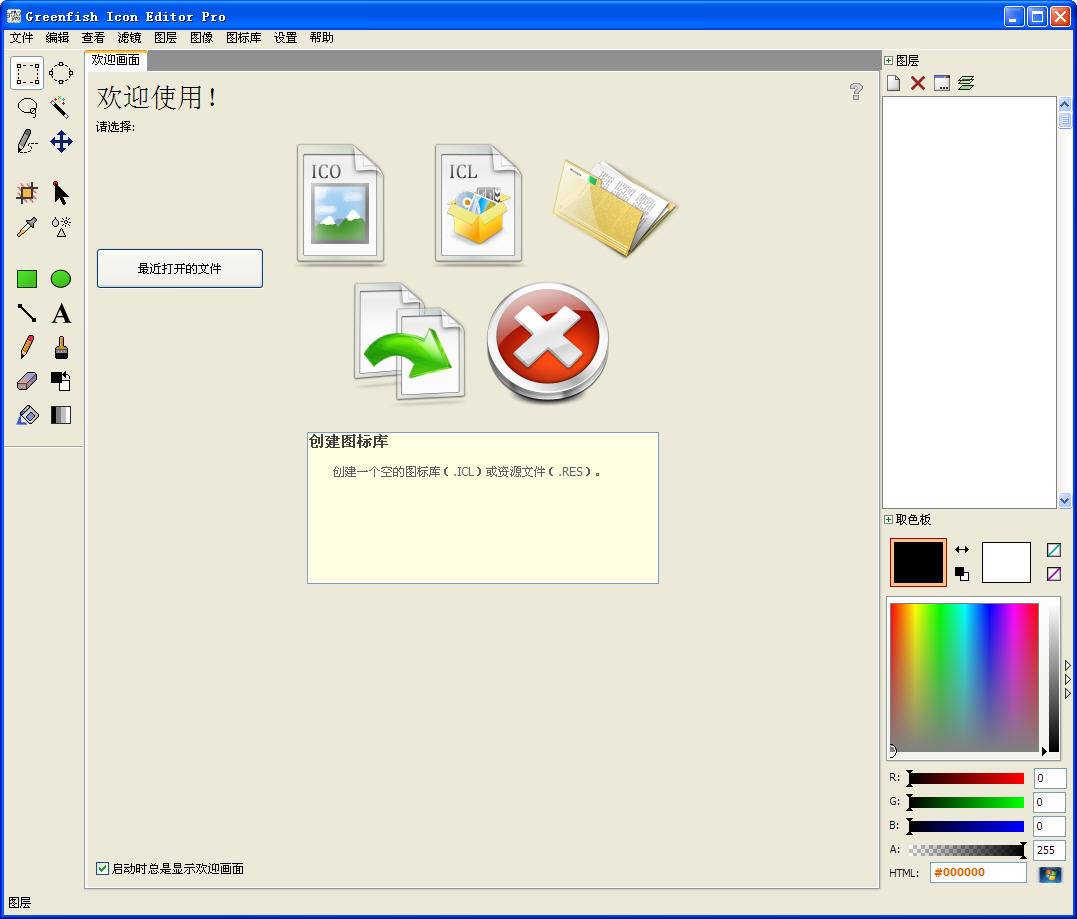
Greenfish Icon Editor Pro (批量转图标)

支持 24 × 24 大小的图标,用来什么呢?工具栏图标!
每一个数字输入框都可以用鼠标滚轮来加减数字。
图片批量转图标
支持剪贴板里的图片,比如,在 Word、PS、GIMP、截图软件里面复制了一部分图片都可以直接粘贴到 GFIE 里面。

默认是英文,打开后可以在 Help => Language 中选择中文

Version: 1.71
Freeware for editing icons, cursors and other pixelgraphic images.
Copyright © 2007-2008 Balázs Szalkai
Portions: TPNGImage © Gustavo Daud, TGIFImage © Anders Melander
Tested by: Claude Charries, Paul Vansumsen, XnTriq
Splash design: Jovan Petrovic

Translated by: Claude Charries, Gerrit Doornenbal, Adam Godula, Chris Grundy, Evgenii Kazantsev, Stanislav A. Kondratov, Arno Krumpholz, JaeHyung Lee, Massimo Manca, Oleg Pakhtusov, Leonardo Augusto Pereira, Jovan Petrovic, sfufoet, Theodoros Stefanidhes, Balázs Szalkai, Tilt, Paul Vansumsen, Asmund Wego, Shih-Huang Wu

You can report bugs and contact us here.
Check for new releases at the Greenfish Downloads page.


Uninstalling GFIE properly:

Choose Help|Preferences|Install and remove all file associations
Delete the program folder
Version history
1.71

Fixed some minor bugs
Added feature: setting max. image width and height separately

1.7

Added feature: opening, editing, saving executable/resource files, using an integrated Resource Editor
Added Russian help (can be downloaded from the Greenfish Homepage)
Changed: "Transform" dialog box: you don't have to set Units separately for Width and Height
Added language packs: Greek, Ukrainian

1.6

Fixed bug: when copying to clipboard, inverted parts were replaced with the transparent color
Added feature: GIF support
Added feature: assembling ICL (icon library) and RES (Win32 resource) files
Added feature: editing Metadata (ANI summary info, JPEG quality, GIF loop count)
Added feature: the canvas can also be enlarged using the Crop tool
Added feature: exporting individual pages
Added language packs: Chinese (traditional), Dutch, Russian

1.51

Fixed bug: a few virus scanners reported .ANI files created by GFIE as "Suspicious", now GFIE creates .ANI files considered "Clean" by them
Fixed bug: opening odd (uneven)-sized icons with GFIE, the transparency became a mess
Added feature: menu item for cropping transparent parts
Added feature: using custom background images in the Test dialog box
Added feature: using the + - * / shortcuts for zooming
Added feature: the mouse wheel can be set for scrolling or zooming under Help|Preferences
Added feature: specifying a target folder for batch converted files
Added language packs: Norwegian, Portuguese (Brazilian), Serbian (Latin)

1.5

Moved Preferences... menu item to Help menu and added a separate Language... menu item
Fixed bug: viewport position was always reset to image center when setting the zoom in a document window
Fixed bug: some PNG files were not able to be opened
Fixed bug: opening a lot of (~30) files and using the hot spot tool greatly decreased performance
Fixed bug: selecting a format at the bottom of the list sometimes caused it to be moved
Fixed bug: pressing the right mouse button while drawing with the left caused strange results
Optimized: now creating better compressed PNG files
Added feature: working with images up to 1024x1024 (upper limit can be increased at your own risk)
Added feature: editing and testing animations, saving them in ANI (animated cursor) files
Added feature: customizing grid and center line colors
Added language packs: Korean, Polish, Spanish

1.4

Fixed bug: compatibility issues: created icons were recognized by Windows, but not always by other graphics programs
Fixed bug: when changing language pack at Preferences, dialog view mode changed to erroneous value -1
Fixed bug: associated files were sometimes opened twice
Fixed bug: Bevel filter generated too crisp results at big radiuses
Fixed bug: custom colors set in windows color dialogs were lost between sessions
Added feature: batch converting image files
Added feature: Tool Behavior/Color Picker windows can be switched to Compact mode
Added feature: showing center lines of images
Added feature: pasting 32-bit images from graphics apps which know the image/png clipboard format, e.g. from GIMP
Added language packs: French, Chinese (simplified)
Minor corrections to other language packs

1.31

Fixed bug: default file extension was not appended when using File|Save as
Added language pack: Italian
Minor corrections to other language packs

1.3

Added feature: multilanguage support
Added feature: using Arrow keys to move view/selection
Added feature: greater values than 100 are also accepted at Filters|Opacity
Added feature: workspace layout (i.e. window positions) is autosaved
"Preferences" dialog was rearranged, new option for setting view mode in Open/Save dialog boxes

1.2

Added feature: drawing gradients in color/transparency mode (for creating fadeouts)
Added feature: startup screen
Minor GUI modifications

1.1

Rearranged the "Tool Behavior" dialog box
Fixed bug: fake tool button at the bottom of the toolbar window
Added feature: file drag and drop support
Added feature: new brush shapes (horizontal, vertical, spray)
Added feature: now the strength of the Eraser tool can be adjusted from 1% to 100%
Added feature: using "Thumbnails" mode also when opening selections/exe files

1.0

Fixed bug: Glow filter sometimes generated the inverted color when choosing white glow color
Fixed listbox flicker, now double-buffered
Fixed bug: a </script> tag was missing from contents.html, this made the Help unusable under IE.
Added feature: Bevel filter
Added feature: "Save all" menu item
Added feature: Open and Save dialog boxes now start in "Thumbnails" view mode
Added feature: tutorials

0.3

Fixed bug: saving extracted cursors in invalid format
Fixed bug: saving .cur files with idType = ID_ICO
Added feature: Glow, Sharpen, Unsharp mask filters
Added feature: new retouch modes: Sharpen, Sponge
Added feature: Preferences dialog box (UsePNG, hatch colors, Import folder, file associations)
Added feature: "Close all" menu item and list of open files in View menu
Added feature: opening files in parameters & using DDE
Optimized: speeded up loading XPM files
Optimized: saving in BMP format now produces files as small as possible


Greenfish Icon Editor Pro (批量转图标) ..

下载请看

☉ 本站广告较多,请大家见谅,我们采用 Cookies 控制广告只显示一次你再次刷新就不会有广告了。

☉ 飞翔90%以上的软件都是本地下载,如果不能下请用网际快车迅雷等下载; 如何下载飞翔的软件或者找不到下载地址请点这里

☉ 默认解压密码为 www.52z.com 欢迎加入 飞翔软件交流群: 210808 2222845 30958999

软件评论

评论共 0 条 查看完整评论内容 
评论昵称: 电子邮件: 评分:
评论内容:
* 请注意用语文明且合法,谢谢合作! Ctrl+回车 可以直接发表

商务合作: QQ:160845 Msn: hncj@msn.com FlyUser@126.com

Copyright 2003-2005 Www.52z.Com 版权所有 湘ICP备 05000461号

本站提供的所有软件均来自互联网下载纯属学习交流之用,如侵犯您版权的请与我们联系,我们会尽快改正请在下载24小时内删除了